
Virtua Racing PCM samples ripping help
Technical discussion about the VGM format, and all the software you need to handle VGM files.
Moderator: Staff
Virtua Racing PCM samples ripping help
Hello, does anybody have any information on how to properly rip the samples from Virtua Racing? I've been trying for years to no avail and I decided to finally post here and ask for help, I have tried the thing with audacity and can't help but wonder where is the start and loop point data being stored? If anyone knows or would like to help it'd be greatly appreciated, thanks in advance!

Re: Virtua Racing PCM samples ripping help
If you're looking for where the start and loop data point are being stored, I believe you're better off just looking at the threads here that have research on the YMW258F, the TG100, and the YM3413. Additionally, ValleyBell's MIDI converter for OutRunners might have some insight on how and where the start and loop point data are being stored.
-

- ValleyBell Offline
- Posts: 1659
- Joined: 2011-12-01, 20:20:07
- Location: Germany
Re: Virtua Racing PCM samples ripping help
MAME's source code has a description of how the sample table works, see multipcm.cpp.
In short: At the very beginning of the ROM, there is a table with 12 bytes per sample.
bytes 0..2 = sample start file offset (+ sample type, encoded into the first byte)
bytes 3..4 = loop start, relative to the sample start
bytes 5..6 = sample size (except that the value needs to be subtracted from 0x10000 to get the actual sample size)
In short: At the very beginning of the ROM, there is a table with 12 bytes per sample.
bytes 0..2 = sample start file offset (+ sample type, encoded into the first byte)
bytes 3..4 = loop start, relative to the sample start
bytes 5..6 = sample size (except that the value needs to be subtracted from 0x10000 to get the actual sample size)
Re: Virtua Racing PCM samples ripping help
Thanks! I will attempt to look at the ROMs with this information and will post my results as soon as I have them!
Re: Virtua Racing PCM samples ripping help
Thanks for the help! Me and a friend managed to make a C program that will look at the table for every MultiPCM Sound ROM you throw at it, but we're running into issues when it comes to exporting to WAV, think you could help us out or at least tell us who may be able to help us out? Thanks!ValleyBell wrote: ↑2025-08-28, 7:36:46 MAME's source code has a description of how the sample table works, see multipcm.cpp.
In short: At the very beginning of the ROM, there is a table with 12 bytes per sample.
bytes 0..2 = sample start file offset (+ sample type, encoded into the first byte)
bytes 3..4 = loop start, relative to the sample start
bytes 5..6 = sample size (except that the value needs to be subtracted from 0x10000 to get the actual sample size)
Here's a screenshot of the program in action, I hope it embeds properly

If not, here's a link: https://freeimage.host/i/untitled.f6qU67t
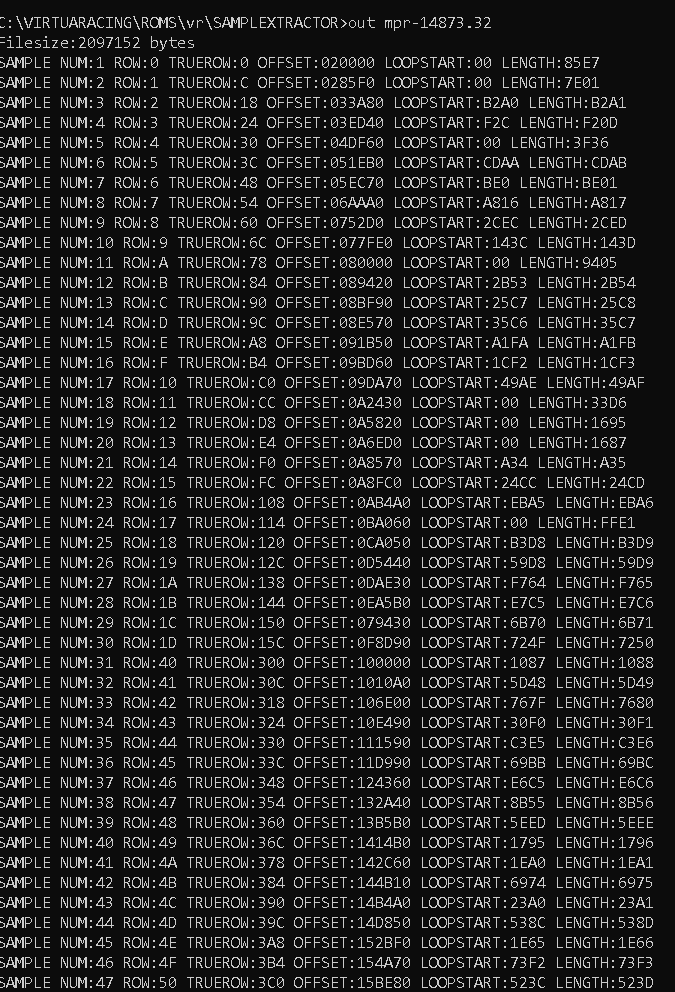

Re: Virtua Racing PCM samples ripping help
I'm actually interested in ripping samples from games that utilizing MultiPCM too, and have already made a script to do that; currently dealing with exactly this rom, so I might be able to help
Re: Virtua Racing PCM samples ripping help
Perfect! I'm looking for a proper way to write a loopable 8bit mono WAV file, we already know how to dump the data but are running into problems making the file header, think you can lend us a hand on that?
Re: Virtua Racing PCM samples ripping help
I have poked around wave files, and have written a whole python function to save those. Essentially what it does is take in data and some parameters, falls back to defaults if some are not present and then just puts them into this array:
Code: Select all
header = [0x52, 0x49, 0x46, 0x46,    # RIFF header
          length_real & 0xFF, (length_real >> 8) & 0xFF, (length_real >> 16) & 0xFF, (length_real >> 24) & 0xFF, # The size of the data after this block, essentially length of the file minus 4 bytes

          0x57, 0x41, 0x56, 0x45,    # 'WAVE' block
          0x66, 0x6D, 0x74, 0x20,    # 'fmt ' block
          0x10, 0x00, 0x00, 0x00,    # Chunk size or something, 4 bytes long.
          0x01, 0x00, 0x01, 0x00,    # Linear PCM, 1 channel
          rate & 0xFF,  (rate >> 8) & 0xFF,  (rate >> 16) & 0xFF,  (rate >> 24) & 0xFF,  # Sample rate
          rate2 & 0xFF, (rate2 >> 8) & 0xFF, (rate2 >> 16) & 0xFF, (rate2 >> 24) & 0xFF,  # Byte rate
          blka, 0x00, bdep, 0x00,    # Block align and bit depth

          0x73, 0x6D, 0x70, 0x6C,    # 'smpl' block
          0x3C, 0x00, 0x00, 0x00,    # Block size.
             0,    0,    0,    0,    # no idea what that empty data is
             0,    0,    0,    0,
             0,    0,    0,    0,
             0,    0,    0,    0,
             0,    0,    0,    0,
             0,    0,    0,    0,
             0,    0,    0,    0,
          0x01, 0x00, 0x00, 0x00,    # ?
             0,    0,    0,    0,
             0,    0,    0,    0,
          loop_type, 0x00, 0x00, 0x00,    # loop type
          # loop points
          loop_start & 0xFF, (loop_start >> 8) & 0xFF, (loop_start >> 16) & 0xFF, (loop_start >> 24) & 0xFF,
          loop_end & 0xFF,   (loop_end >> 8) & 0xFF,   (loop_end >> 16) & 0xFF,   (loop_end >> 24) & 0xFF,
             0,    0,    0,    0,
             0,    0,    0,    0,    # some more unknown data

          0x64, 0x61, 0x74, 0x61,    # 'data' block
          data_length & 0xFF, (data_length >> 8) & 0xFF, (data_length >> 16) & 0xFF, (data_length >> 24) & 0xFF # size of that
         ]
There might be some jank in it, but it works for what I have done
Nota again that this snippet is python and not c/++, sorry for that as I am only really good with python